The vocal channel
Sing and play at once
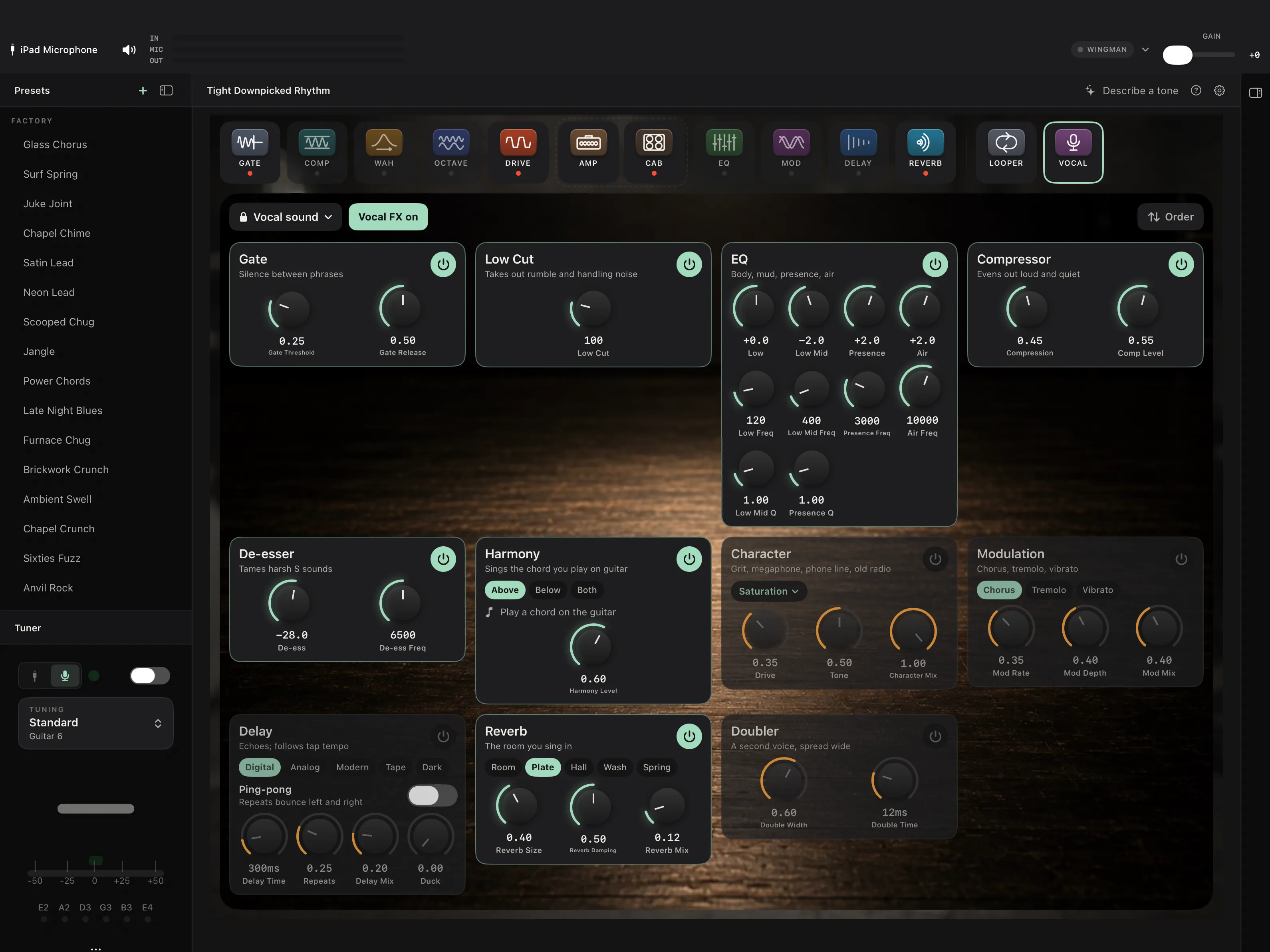
Guitar into the first input, a microphone into the second, and RigShed runs two chains at the same time — your rig, and a separate one built for a voice.
Nothing is shared between them. The gate on your voice is not the gate on your guitar, and setting one does not touch the other.
The part people do not expect
It listens to your guitar and sings the chord
Play a chord. The harmony block works out what it is, shows you on screen, and puts a voice above yours, below it, or both.
Not a fixed interval that goes wrong the moment the chord changes — it is following the harmony you are actually playing, from your guitar's own input, while you sing over it.
Which means it needs the guitar and the microphone on separate inputs to work. The app says so when they are not, rather than quietly doing something strange.
Ten blocks, in whatever order you want
The default is the order an engineer would patch, and you can move them. The doubler is always last, because turning a mono voice into a stereo pair is the thing you do at the end.
- 1Gate
- Shuts the microphone when you are not singing into it.
- 2Low cut
- Takes out the rumble a stage floor puts into a mic stand.
- 3EQ
- Four bands, for the room you are actually in.
- 4Compressor
- Evens out the difference between a verse and a chorus.
- 5De-esser
- Takes the edge off sibilance without dulling the rest.
- 6Harmony
- Listens to your guitar, works out the chord, sings with you.
- 7Character
- Saturation, megaphone, telephone, radio.
- 8Modulation
- Chorus, tremolo, vibrato.
- 9Delay
- Including a duck that gets out of the way while you sing.
- 10Reverb
- The room you want to sound like, rather than the one you are in.
Fifteen voice sounds to start from, and you can save your own. A vocal lock keeps your voice where you set it while you change guitar rigs all evening.
One button for talking to the room
Vocal FX drops the harmony, character, modulation, delay, reverb and doubler, and leaves the gate, low cut, EQ, compressor and de-esser where they are.
So between songs you still sound like someone with a decent microphone, rather than someone announcing the next number from the bottom of a stadium. On Stage it is on a footswitch too, so you do not reach for the phone.
Two outputs, two channels on the desk
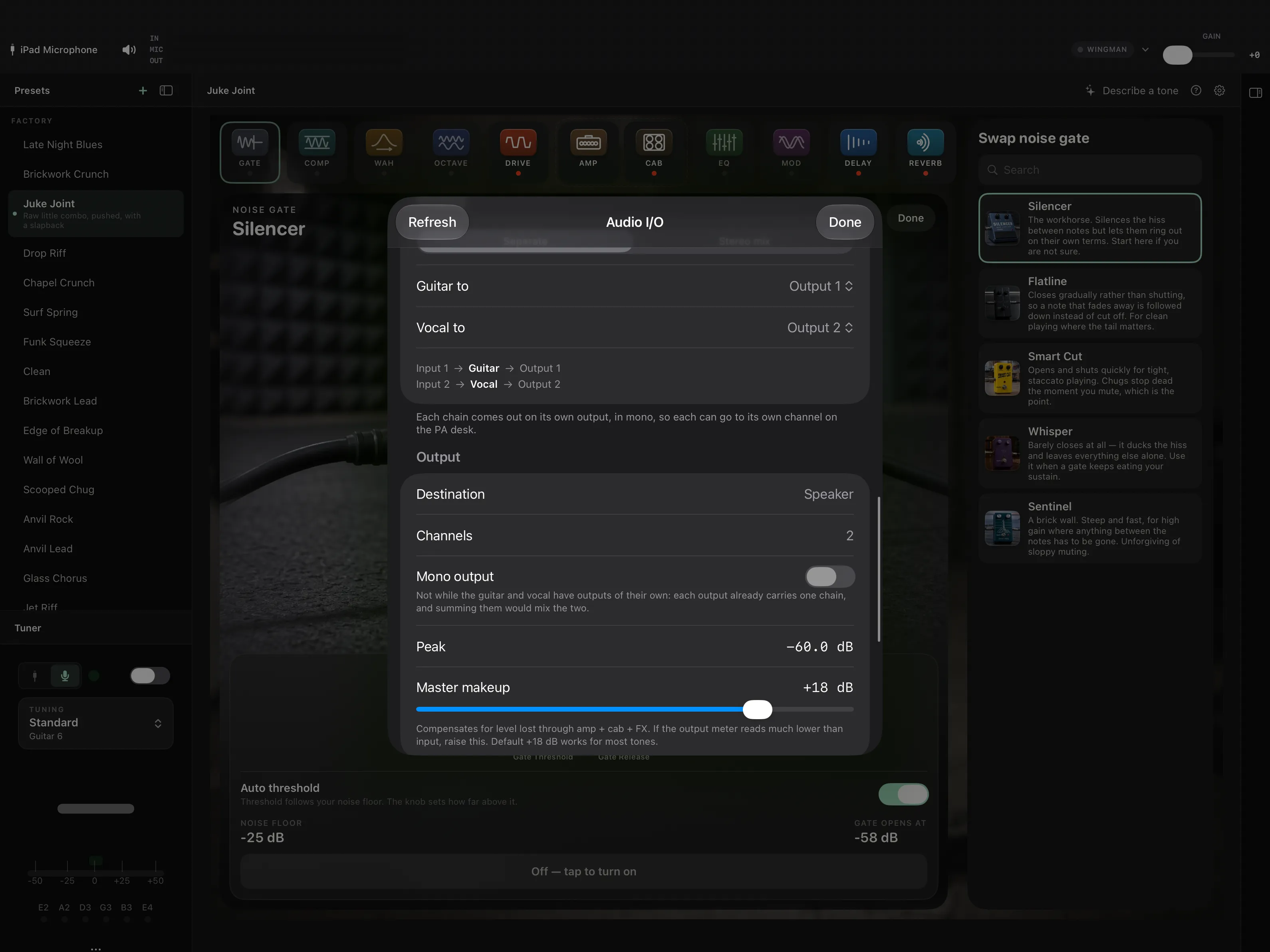
Separate
Guitar out of output 1, voice out of output 2, straight into two channels. The engineer gets what they need and can treat them differently.
Stereo mix
Both together, for headphones — which is what you want at home, and what you do not want at a gig.
There is a mic gain control with a meter beside it, a separate level for the voice, and a warning if what you have patched clashes with the hardware effects loop.
Two things it does not do yet
The looper does not record your voice
It records the guitar. Looping a vocal line means moving the looper to a different place in the signal path, and that is a careful change to the part of the app people rely on most, so it has not been rushed.
Voice sounds change on screen, not from a footswitch
Vocal FX and the individual blocks respond to a footswitch. Switching to a whole different voice sound is still something you reach over and tap.
Try it before you pay for it
Plug a microphone in on any tier and it works. Without Stage you get one sound — Natural: the gate, low cut, EQ, compressor, de-esser and a small plate, at their standard settings. That is a corrected, usable voice, and it is enough to hear yourself through the rig and know whether the rest is for you.
What Stage adds is changing any of it. On the tiers below it the blocks are shown but not adjustable, the chain cannot be reordered, and the other fourteen sounds are locked — along with the harmony, the effects, saving sounds of your own, the footswitch control and the separate outputs.
Join the TestFlight beta — link pending